
Olympic Trap · Custom Table
Custom Trap Table (11)
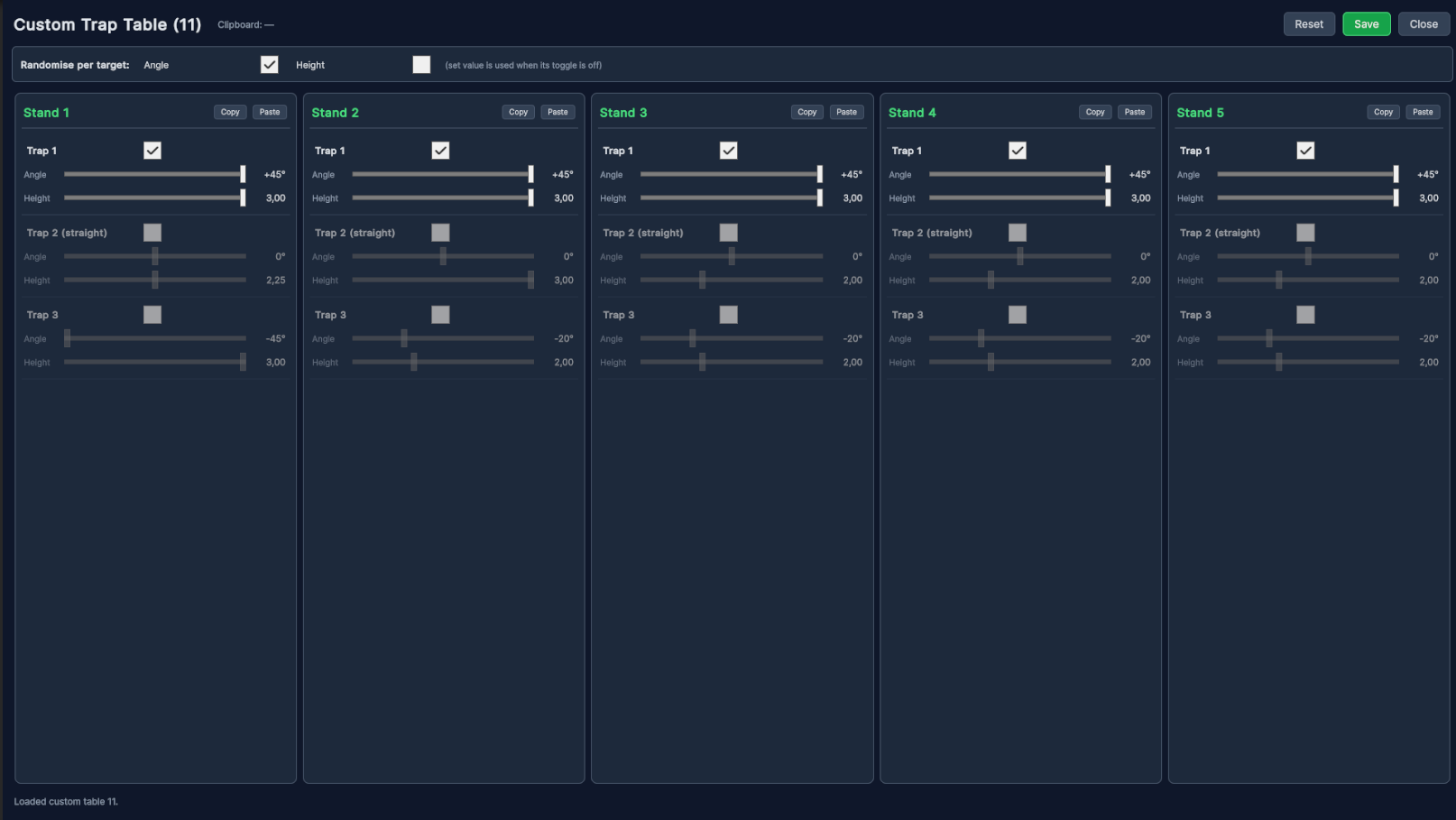
Table 11 is your own editable Olympic Trap layout — the eleventh option after the ten fixed ISSF tables. Every machine's angle and height is yours to set, individual machines can be switched on or off for focused training, and the whole table is remembered between sessions.
1The layout
The editor shows the five shooting stands side by side. Each stand has the three physical machines sat in the trench in front of it: Trap 1, Trap 2 (the straight machine) and Trap 3. Across all five stands these are the familiar machines Trap 1–15 — Stand 1 holds Trap 1–3, Stand 2 holds Trap 4–6, and so on through Stand 5 (Trap 13–15).
For each machine you set an angle and a height. That is all a trap table is — fifteen machines, each with a fixed launch. The round itself then draws targets from these machines exactly like a standard ISSF table.
2Angle & height
Drag the sliders to set each machine. Values snap to convenient increments so tables stay tidy and repeatable.
| Setting | Range | Step | What it controls |
|---|---|---|---|
| Angle | −45° to +45° | 5° | The machine's left / right launch direction. |
| Height | 1.50 to 3.00 | 0.05 | The launch height / trajectory, on the same scale as the ISSF tables. |
3Switching machines on & off
Every machine has a checkbox. A ticked machine is in play; an unticked one is left out of the round entirely, and its five targets are shared among the machines that remain. This is the heart of focused training.
4Randomise per target
At the top of the editor are two toggles — Angle and Height. When a toggle is on, that value is re-rolled fresh for every target across the round. When it is off, the value you set on each machine is used as-is.
The two toggles are independent, so you can fix one axis and randomise the other:
- Set every machine to 0° and turn Randomise Height on → straight targets that climb to a different height each time.
- Leave the height as set and turn Randomise Angle on → a constant trajectory with the direction changing every target.
5Copy & paste a stand
Each stand has Copy and Paste buttons in its header. Copy picks up that stand's three machines — angles, heights and on/off states — into a single clipboard, shown in the top bar. Paste drops the clipboard onto another stand. It's the quick way to make a whole table uniform: set Stand 1, Copy, then Paste onto Stands 2–5.
6Save, reset & close
- Save stores the table on the device. It is remembered and reloaded automatically next time — including the on/off states and the randomise toggles.
- Reset returns every machine to the default spread. Nothing is stored until you press Save, so a reset is easy to undo by simply closing without saving.
- Close shuts the editor. Any changes you haven't saved are discarded.
7How it plays in a round
Choose table 11 and run an Olympic Trap round as usual. With all three machines on a stand enabled, the target distribution matches a standard ISSF table — over the five visits to a stand you get two from Trap 1, one from the straight Trap 2, and two from Trap 3, in a shuffled order. Disabled machines simply drop out and their share is redistributed among the machines left on.
8Training ideas
Straight-only
Build confidence on the straight target before adding angle.
Only Trap 2 enabled, every standHeight ladder
Read rising targets without guessing direction.
All 0° · Randomise Height onAngle drill
Train left / right pickup on a constant trajectory.
Fixed height · Randomise Angle onMirror a stand
Set one stand the way you like, then repeat it across the layout.
Copy Stand 1 → Paste 2–5